OBS.Ninja  
  Copy this URL into an OBS "Browser Source" =>  
  You are in a director's view  
You are joining room:


Add Group Video Chat to OBS


  • Anyone can enter a room if they know the name, so keep it unique
  • Having more than four (4) people in a room is not advisable due to performance reasons

  • With a room name entered, enter the room as a director. Links to invite guests will be provided.

    Add your Camera to OBS


    Select the audio/video source below and when you're ready just click START SHARING WEBCAM


    Video source:


    Audio source:

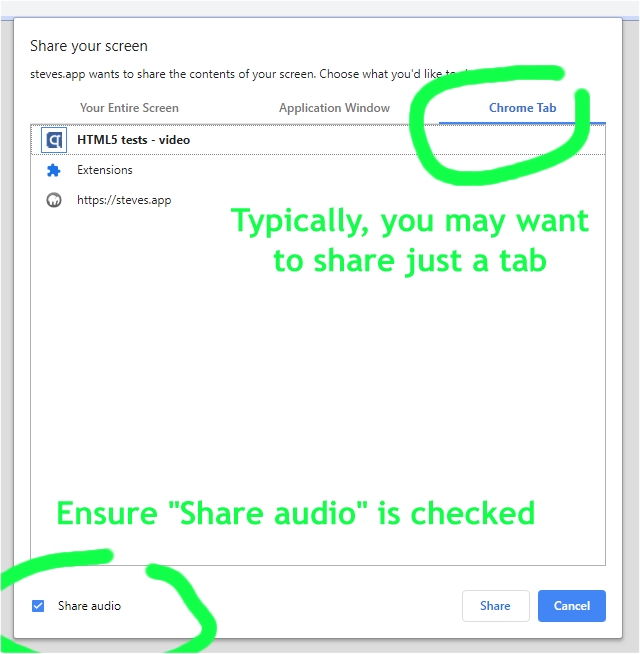
    Remote Screenshare into OBS

    note: Do not forget to click "Share audio" in Chrome.
    (Firefox does not support audio sharing.)


    What is OBS.Ninja


  • 100% free; no downloads; no personal data collection; no sign-in
  • Bring video from your smartphone, laptop, computer, or from your friends directly into your OBS video stream
  • We use cutting edge Peer-to-Peer forwarding technology that offers privacy and ultra-low latency

  • Youtube video Demoing it here
  • Code is open-sourced: https://github.com/steveseguin/obsninja
  • You can also check out StageTEN.tv for a more feature-rich paid-solution

  • Known issues:
  • ** MacOS users need to use OBS v23. v24/v25 have a bug in it


  • Send feature requests and support to steve@seguin.email, or check out the sub-reddit

    Icons made by Lucy G from www.flaticon.com is licensed by CC 3.0 BY