 4f1cde06f2
- Renamed to `ImColor32` to avoid confusion with `ImColor` from the C++.
  code: https://github.com/ocornut/imgui/blob/9499afdf/imgui.h#L2180
    - Eventually I'd probably like to add something mirroring the actual
      `ImColor`.

- Now supports construction and access from `const fn` where possible.
    - Still impossible for the `f32` APIs

- Now supports `.r`/`.g`/`.b`/.a` field access (read and write), by way
  of a new type `imgui::color::ImColor32Fields`, which essentially
  exists just to serve this purpose. This is a bit cludgey, but lets us
  provide the ability for reading and writing `r/g/b/a` values without
  adding many `fn get_r(self) -> u8` and `fn set_r(&mut self, r: u8);`
  style functions.

- No longer requires FFI calls to construct from RGB floats.
    - This gives much more freedom to the optimizer, as external calls
      are impenetrable optimization barriers (It has to pessimistially
      assume that they read/write to all globally accessable memory, and
      must be called in the exact order that is listed).
    - Also, it allows inlining these calls, and avoid computing the same
      value twice (if the args are the same).

    - Also improves usage from IDEs, debuggers, etc, and avoids a rare
      possibility of UB if NaN was passed in (however, this almost
      certainly could only cause problems if cross-lang LTO was used,
      which I believe we don't support).

    - This code is more complex than needed, but was taken from another
      project of mine (functions were renamed to line up with imgui's
      names), and has good (literally exhaustive) test coverage.

    - Unfortunately, float arithmetic in const fn is still not allowed,
      so for now these aren't usable `const fn`.

- Added utility constants to mirror the `IM_COL32_WHITE`,
  `IM_COL32_BLACK`, `IM_COL32_BLACK_TRANS` constants.

imgui-rs: Rust bindings for Dear ImGui



(Recently under new maintenance, things subject to change)
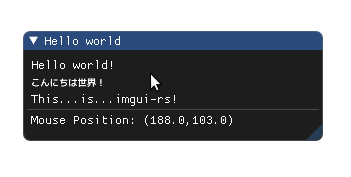
Window::new(im_str!("Hello world"))
    .size([300.0, 100.0], Condition::FirstUseEver)
    .build(&ui, || {
        ui.text(im_str!("Hello world!"));
        ui.text(im_str!("こんにちは世界!"));
        ui.text(im_str!("This...is...imgui-rs!"));
        ui.separator();
        let mouse_pos = ui.io().mouse_pos;
        ui.text(format!(
            "Mouse Position: ({:.1},{:.1})",
            mouse_pos[0], mouse_pos[1]
        ));
    });
Main library crates
- imgui: High-level safe API
- imgui-glium-renderer: Renderer implementation that uses the
gliumcrate - imgui-gfx-renderer: Renderer implementation that uses the
gfxcrate (not the new gfx-hal crate) - imgui-winit-support: Backend platform implementation that uses the
winitcrate (0.22 by default, but 0.19-0.21 are supported via feature flags) - imgui-sys: Low-level unsafe API (automatically generated)
Features
- Bindings for Dear ImGui that can be used with safe Rust. Note: API coverage is not 100%, but will keep improving over time.
- Builder structs for use cases where the original C++ library uses optional function parameters
&ImStr/ImStringtypes andim_str!macro for defining and passing null-terminated UTF-8 to Dear ImGui, which doesn't accept Rust&str/Stringvalues. See issue #7 for more information and justification for this design.- Easy integration with Glium / pre-ll gfx (renderer)
- Easy integration with winit (backend platform)
Choosing a backend platform and a renderer
Almost every application that uses imgui-rs needs two additional components in
addition to the main imgui crate: a backend platform, and a renderer.
The backend platform is responsible for integrating imgui-rs with the operating system and its window management. Its responsibilities include the following:
- Handling input events (e.g. keyboard, mouse) and updating imgui-rs state accordingly
- Passing information about the OS window (e.g. size, DPI factor) to imgui-rs
- Updating the OS-side mouse cursor when imgui-rs requests it
The renderer is responsible for taking generic, renderer-agnostic draw lists generated by imgui-rs, and rendering them using some graphics API. Its responsibilities include the following:
- Rendering using vertex/index buffers and command lists
- Handling of DPI factors and scissor rects
- Texture management
The most tested platform/renderer combination is imgui-glium-renderer +
glium + imgui-winit-support + winit, but this is not the only possible
combination. There's also imgui-gfx-renderer, and you can find additional 3rd
party crates that provide a wider support for more libraries (e.g. raw OpenGL,
SDL2). You can also write your own support code if you have a more advanced use
case, because imgui-rs is not tied to any specific graphics / OS API.
Compiling and running the demos
git clone https://github.com/imgui-rs/imgui-rs
cd imgui-rs
git submodule update --init --recursive
Main examples are located in the imgui-examples directory.
# At the reposity root
cd imgui-examples
cargo test

cargo run --example hello_world
cargo run --example test_window
cargo run --example test_window_impl
Examples for the gfx backend are under the imgui-gfx-examples directory.
cd imgui-gfx-examples
cargo test

cargo run --example hello_world
cargo run --example test_window
Note to Windows users: You will need to use the MSVC ABI version of the Rust compiler along with its associated dependencies to build this libary and run the examples.
How to contribute
-
Change or add something
-
Make sure you're using the latest stable Rust
-
Run rustfmt to guarantee code style conformance
rustup component add rustfmt cargo fmt -
Open a pull request in Github
License
Licensed under either of
- Apache License, Version 2.0, (LICENSE-APACHE or http://www.apache.org/licenses/LICENSE-2.0)
- MIT license (LICENSE-MIT or http://opensource.org/licenses/MIT)
at your option.
Uses Dear ImGui and cimgui.
Contribution
Unless you explicitly state otherwise, any contribution intentionally submitted for inclusion in the work by you, as defined in the Apache-2.0 license, shall be dual licensed as above, without any additional terms or conditions.